How to Sell Lumber Online: A Small Mill Checklist
Six steps for listing slabs accurately, pricing by board foot, handling freight, and keeping inventory up to date.
Read the checklist →Record live-edge slabs with photos, dimensions, board footage, and prices. Share available inventory with customers through a public gallery.
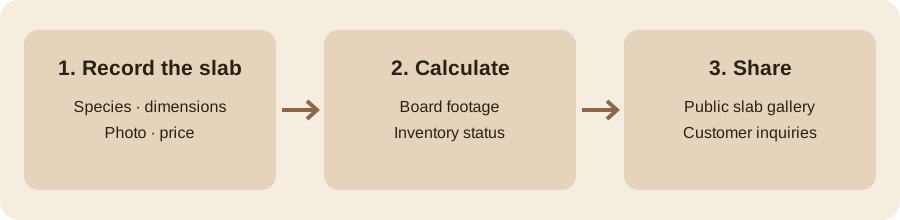
From slab measurements to a gallery customers can browse.
Record each slab’s species, dimensions, board footage, price, and availability. Automatic numbering and board-foot calculations keep inventory organized.
Take photos directly from your phone on the shop floor. Keep slab photos with your inventory records in the cloud.
Give customers a public gallery of available slabs. They can filter by species, check dimensions and prices, and send an inquiry.
Add your slab gallery to an existing website with one line of code. The widget supports common website builders.
Moving from Traece? Export your inventory as a CSV file, then import it into MillVault. Keep your slab records together.
Review species sales and revenue in your shop analytics when this Premium feature becomes available.
Choose from two plans with no hidden fees, and cancel anytime.
Practical guides for tracking, pricing, and selling lumber.
Six steps for listing slabs accurately, pricing by board foot, handling freight, and keeping inventory up to date.
Read the checklist →MillVault keeps slab and lumber pack records together with photos, dimensions, board footage, pricing, and availability.
Yes. Enter slab measurements and MillVault calculates board footage to help you keep records and prices consistent.
Yes. Share or embed a public gallery showing available inventory. When you mark a slab sold in MillVault, its availability updates in the gallery automatically.
MillVault supports CSV imports from Traece. You can move existing slab records into one inventory.
Yes. You can capture slab photos and work with inventory records from your phone.
Basic costs $29 per shop per month. Premium costs $39 per shop per month. Both plans offer a seven-day free trial, and you can cancel anytime.
Yes. Try MillVault free for seven days, with no credit card required to start.
Yes. Export your inventory data from MillVault when you need a copy for your records or another system.
Yes. Virtual setup assistance is available for $150. Contact us to arrange setup or discuss an in-person quote.
You can cancel your subscription at any time through subscription management. Refund requests are reviewed case by case; contact MillVault with your request. See the Terms of Service for details.
No. MillVault focuses on slab inventory and customer galleries, not bookkeeping or payment processing.
MillVault is built for sawyers who want to manage their inventory. Tell us which feature would help your shop run better.
Internal management — MillVault
Import from Traece — click to upload your CSV export
All Traece columns supported
| Photo | Inv # ↕ | Species ↕ | L" ↕ | W min–max | T" ↕ | BF ↕ | $/BF ↕ | Characters | Price ↕ | Status | Actions |
|---|---|---|---|---|---|---|---|---|---|---|---|
🪵 Import your CSV or add slabs manually | |||||||||||
Live edge slabs, locally sourced
Manage your subscription, payment method, and invoices securely through Stripe.
Paste this into any website to embed your public gallery.